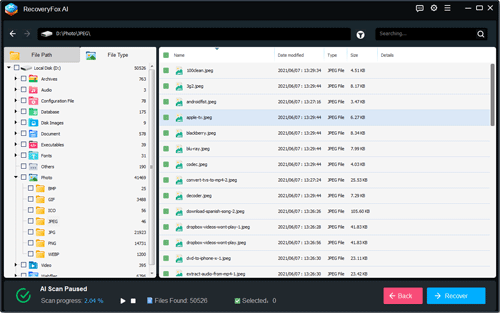
🦊 RecoveryFox AI v2.0.0 was released on June 3, 2026.

📢 Major Upgrade: This update significantly improves partition recovery, Recycle Bin recovery, desktop file recovery, and USB storage recovery. It also expands AI scan compatibility across all file system formats, enhances AI-powered file reconstruction, and improves scanning performance and overall system stability.

Interface

Step 1, Click the button to download the latest version.

Step 2, Install it to your computer and overwrite the old version.

Note:
- No need to uninstall the current version.
- No need to register it again if the software has been activated already.
- More software information please visit the Home Page.

Icon

RecoveryFox AI

Recover smarter with AI. Use it to precisely identify every lost data fragment and rebuild them into complete files, perfect for different data loss scenarios. Natively support a wide range of file types and drives to meet all your recovery needs.

New product promo, save 22% instantly

1-YEAR LICENSE

Perfect for professionals, businesses, or anyone prioritizing long-term data security

$69.95 $89.95

More license plans >>

The installer and license code will be sent to you immediately after your payment.

Update Logs:

v2.0.0 (Major Upgrade)
June 4, 2026
  • New Features
  • 1. Recycle Bin recovery supports deleted file restoration across all drives, including lost or repartitioned volumes.
  • 2. Desktop AI Scan: Upgraded from Quick Scan-only (v1.0) to Quick Scan + AI Scan, improving recovery rate and file integrity.
  • 3. Enable direct scanning of deleted or lost partitions, unallocated space, and RAW drives without requiring formatting or partition rebuilding.
  • 4. AI Scan supports all major file systems (FAT12/16, EXT2/3/4, XFS, HFS+, APFS) and can recover data even from unrecognized file systems.
  • 5. Added Existing Files scanning and categorization, allowing users to view and manage files currently present on a disk.
  • 6. AI Scan now supports real-time result preview during scanning without waiting for completion.
  • 7. Added floating preview support for long file names, improving readability of full file information
  • 8. AI Scan can automatically extract original file name metadata for certain files and categorize them separately for faster recovery prioritization.
  • 9. AI Scan can reconstruct partially missing or corrupted file names and group them into dedicated categories.
  • 10. Added preview support for professional file formats including 3DMAX, CAD, and REVIT (BIM models).
  • 🚀 Performance & Recovery Improvements
  • 1. Significantly improved scanning capability, recovery performance, and stability for USB storage devices such as USB drives, SD cards, and TF cards.
  • 2. Quick Scan now supports partial repair of lightly corrupted files, improving recovery success rate and file integrity.
  • 3. AI Scan enhances structured data reconstruction for 100+ common file formats, enabling partial data recovery into complete files.
  • 4. Optimized memory management to support scanning of millions of files, improving stability on large-capacity storage devices.
  • 5. Refined scanning, analysis, and indexing pipeline for higher efficiency in complex recovery scenarios.
  • 6. Built-in comprehensive text encoding libraries to minimize file name and path corruption or garbling.
  • 7. Improved recovery performance for archives, container files, and their internal structures.
  • 8. File details now prioritize original file paths; when unavailable, available metadata is displayed instead.
  • 9. Automatically filters system temporary files and application cache data to reduce irrelevant scan results.
  • 10. Unified ascending sorting logic for AI Scan tree view and file type classification for better usability.
  • 11. Improved Recycle Bin scan path detection, showing source drive-level Recycle Bin locations and intelligently identifying historical partitions.
  • 12. Optimized address bar logic to prioritize real file paths in the scan interface.
  • 13. Improved scan progress handling for FAT32 and exFAT file systems.
  • 14. Enhanced Settings's UI layout and user experience.
  • 15. Updated activation and licensing system for improved stability and reliability.
  • 16. All file processing is performed locally. No data is uploaded. A security notice is shown during the first three scans to reinforce privacy assurance.
  • 🐛 Bug Fixes
  • 1. Fixed abnormal progress display when pausing scans.
  • 2. Fixed JPG preview rendering errors.
  • 3. Fixed directory creation failure during image recovery in some cases.
  • 4. Fixed issue where SSD scans could not be stopped properly.
  • 5. Fixed inaccurate partition scan progress reporting.
  • 6. Fixed exceptions occurring during file filter operations.
  • 7. Fixed crashes when closing the application in certain scenarios.
  • 8. Fixed progress issues during consecutive multi-partition scans.
  • 9. Improved state transitions between scanning, pausing, stopping, and resuming.
  • 10. Fixed missing or incorrect completion dialog display in some cases.
  • 11. Fixed overlapping UI windows in multi-window scenarios.
  • 12. Reduced risk of recovery conflicts caused by temporary file overwriting.
  • 13. Fixed crashes caused by rare or unsupported file formats.
  • 14. Fixed inconsistent thumbnail rendering in preview mode.
  • 15. Fixed crashes caused by excessive preview cache usage.
  • 16. Fixed incorrect AI reconstruction of similar files, improving recognition accuracy.
  • 17. Fixed mismatch between tree view and file list selection states.
  • 18. Fixed inconsistency between selected files and actual recovery output.
  • 19. Fixed abnormal behavior in Recycle Bin preview mode.
  • 20. Fixed mismatch between selected items and recovered results in Preview interface.
  • 21. Fixed failures caused by busy Recycle Bin states.
  • 22. Improved accuracy of metadata display including modification time, author, and file classification.
  • 23. Fixed other issues and further improved software stability and compatibility.
v1.0.0
Apr 1, 2025
  • RecoveryFox AI v1.0.0(the first version) has been released on Apr 1, 2025.

Unregistered Version vs Full Version

Unlock the power of full version to access more benefits at a cost-efficient price!

Unregistered
Full Version
AIAI for fragments scan and rebuild
Yes
Yes
NTFSNTFS, exFAT, FAT32 support
Yes
Yes
Format500+ file formats compatibility
Yes
Yes
PreviewPreview file before recovery
Yes
Yes
RecoveryUnlimited recovery
No
Yes
SupportProfessional technical support
No
Yes
Money backMoney back guarantee
No
Yes

Terms and ConditionsPrivacy PolicyLicense AgreementRefund PolicyCookies Policy

Copyright © 2026 RecoveryFox. All Rights Reserved.