






 Free Download
 Windows


Have you noticed that when you delete files from an SD card on a PC, they are marked as “permanently deleted” and never appear in the Recycle Bin? Unlike files deleted from a hard drive, SD card data is removed directly, without any intermediate recovery stage.

If you lost photos from an SD card due to accidental deletion, there is no need to panic. In most cases, the photos are still recoverable, provided that no new data has overwritten the card.
Below, we will guide you step-by-step on how to recover permanently deleted photos from an SD card.
An Important Reminder Before Recovery
To maximize your recovery success rate, follow these three golden rules whenever data loss occurs.
Rule 1: Stop using the SD card immediately.
Any new photos, videos, or files written to the card may overwrite the deleted data, making recovery impossible.
Rule 2: Prepare a safe storage location.
Use a computer with enough free space or an external drive to save the recovered photos. Never restore files to the same SD card.
Rule 3: Act quickly with a compatible and trusted data recovery tool to start recovering.
Steps to Recover Deleted Photos from SD Card
RecoveryFox AI is highly recommended for recovering deleted photos from SD cards. It supports a wide range of image formats, including common formats like JPG, PNG, and BMP, as well as professional camera RAW formats such as ARW, DCR, MRW, PTX, RW2, and more. You can scan and preview recoverable photos for free before deciding whether to activate the full recovery feature.
Beyond accidental deletion, this powerful photo recovery software can also recover lost photos and other files after SD card formatting, virus attacks, system crashes, partition loss, and other data loss scenarios.
Free to scan and preview recoverable photos. Now, try this quick SD recovery software here:
Step 1. Connect your SD card into the computer using a card reader.
Launch RecoveryFox AI and select the SD card from the drive list.
Click it to start scanning.
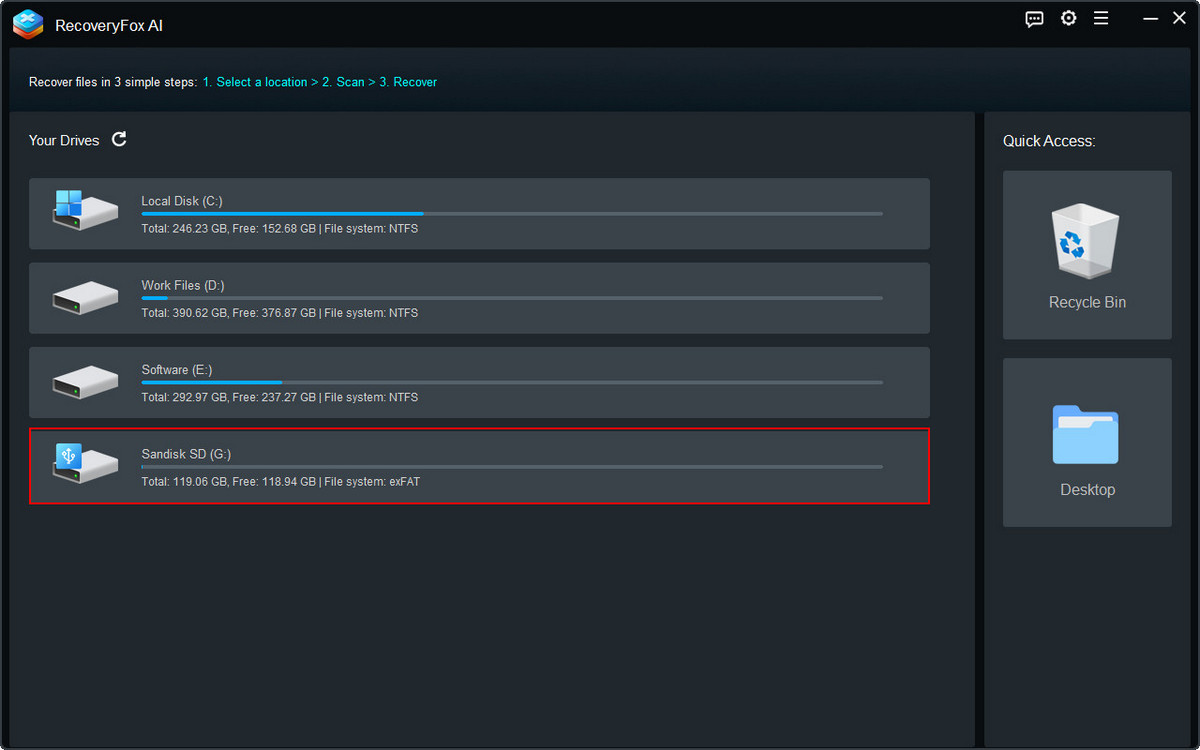
Step 2. For recently deleted photos, Quick Scan can quickly retrieve them within minutes, and even faster.
For formatted data recovery, allow AI Scan to complete for the best results.
You may pause the AI Scan at any time.
When the scan is finished or paused, results will be displayed by File Path and File Type.
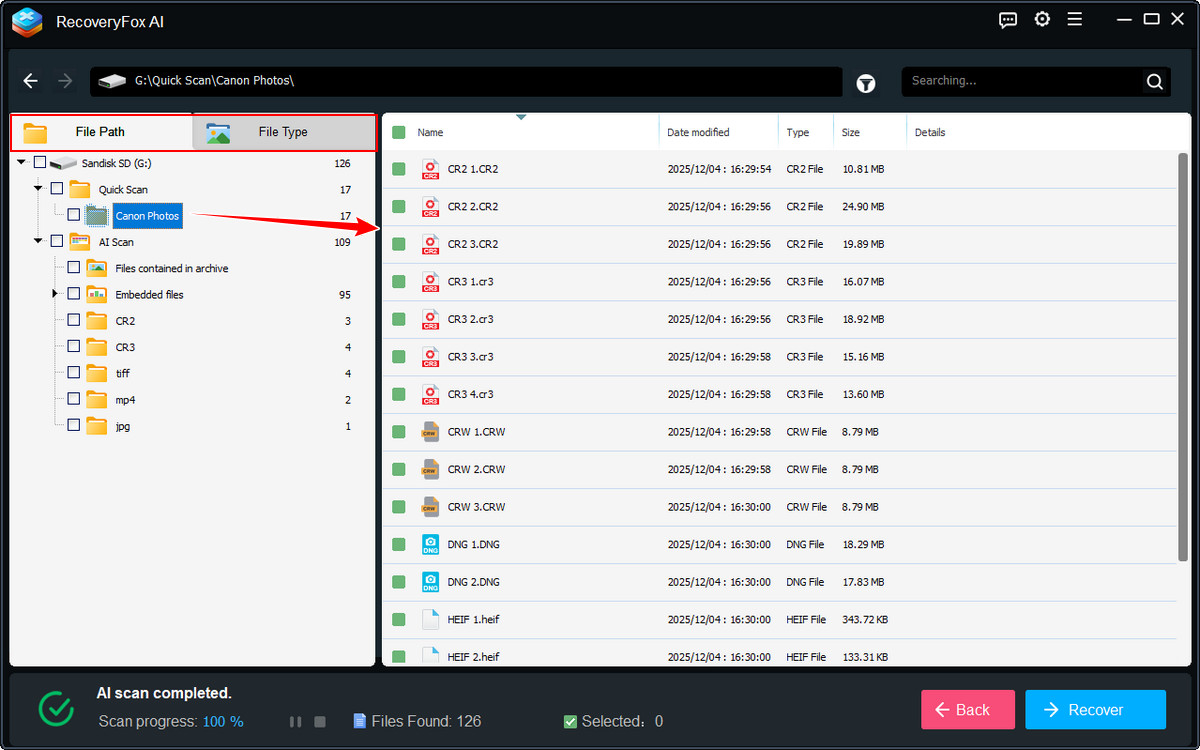
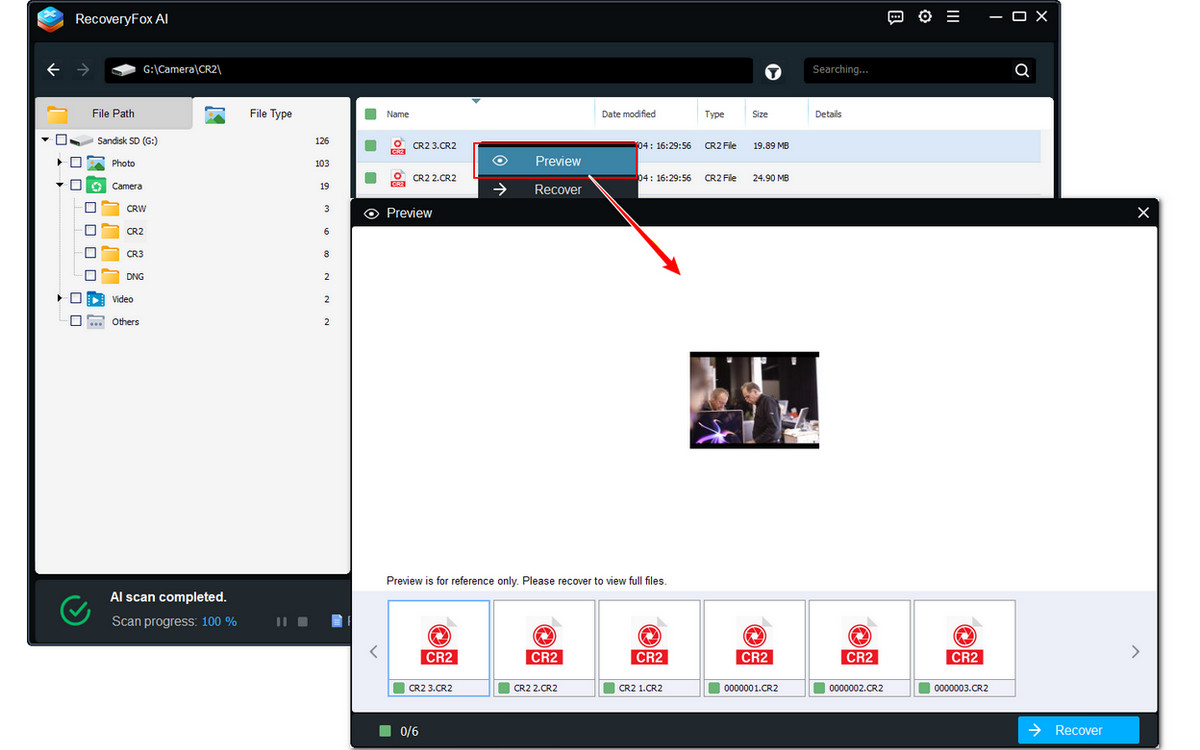
Step 3. Go to File Type and open the Photo or Camera folder to locate your photos quickly.
Click the file to preview it.
Select the photos you want to restore and click Recover.
Choose a different drive as the destination to save the restored photos.
To Sum Up
Even if photos are deleted permanently by mistake, they are often still recoverable. Stop using the SD card immediately and start recovery as soon as possible to maximize success.
RecoveryFox AI offers an intuitive interface, a recovery rate of up to 98%, and free scan and preview. Try it now and recover your precious photos in minutes.
FAQs
Q1. Can I recover pictures deleted from an SD card?
Yes, in most cases you can recover deleted pictures from an SD card, as long as the data has not been overwritten. When photos are deleted, they are usually marked as “free space” but remain physically on the card. By stopping use of the SD card immediately and using RecoveryFox AI or another dedicated data recovery tool, you have a high chance of restoring your lost photos.
📚 Related Read: Shift + Delete vs Delete in Windows: What Really Happens to Your Files?
Q2. Do deleted photos stay on an SD card?
Yes, deleted photos typically stay on the SD card until new data overwrites them. The file system only removes the reference to the files, not the actual data.
Q3. Can you recover photos after formatting an SD card?
Often, yes. Photos can usually be recovered after a quick format, but success depends on whether the data has been overwritten.
Q4. Is RecoveryFox free?
RecoveryFox AI allows you to scan the SD card and preview recoverable photos at no cost. To actually restore and save the recovered photos, a paid license is required (4 flexible plans available: 1-week, 1-month, 1-year, and lifetime).

A technical content writer for RecoveryFox AI at WonderFox Soft, creating clear guides on data recovery, storage technologies, and Windows troubleshooting. She specializes in simplifying complex technical topics and enjoys exploring technology, running, and discovering new experiences.





 English ^


