






 Free Download
 Windows


Can I Recover Files from a Formatted SD Card?
Yes, in most cases, you can recover data from a formatted SD card, especially if it was a quick format.
However, the actual data remains physically stored on the card until new files overwrite it. That’s why data recovery is often possible after a quick format.
However, if your formatted SD card is in any of the following situations, the chance of recovery may be greatly reduced or even impossible:
- Keep using the SD card, such as taking new photos, recording videos, transferring files;
- The SD Card has physical damage, such as having a broken chip or connector, software-based recovery methods may not work.
- You perform a Full Format, rather than a Quick Format. Unlike a quick format, a full format not only removes the file index but also overwrites the existing data, making recovery much harder.
What to Do Immediately after Formatting an SD Card?
Your actions directly impact recovery success. To maximize the chance of recovery, follow these best practices:
✔️ Stop using the SD card immediately
Avoid taking new photos, recording videos, or transferring files.
✔️ Remove the SD card safely
Disconnect it from your camera, drone, or phone to prevent overwriting needed files due to background writes.
✔️ Do not reformat or repair the card
Reformatting or running repair tools can lower recovery chances.
✔️ Use a trusted data recovery tool
Professional data recovery software is often the fastest way to restore data from a formatted drive, especially when no backup is available.
✔️ Prepare a separate storage device
Always save recovered files to a different drive to avoid overwriting.
How to Recover Formatted SD Card without Backup?
If you don’t have a backup, using a professional data recovery tool is the most effective option to restore your formatted SD files.
RecoveryFox AI is a solid option for these accidental formatting scenarios. It offers a 98% recovery rate and supports a wide range of file types, including mainstream image formats and video formats such as ARW, DCR, MRW, PTX, RW2, RAW, MP4, AVI, MKV, MOV, MPG, and more.
It also allows free scanning and preview, so you can check whether your lost data is recoverable before proceeding.
To get started, download RecoveryFox AI and follow the steps below to recover deleted or lost photos from your SD card safely and efficiently:
Step 1. Connect your formatted SD card to a computer using a card reader.
Launch RecoveryFox AI and locate the card from the list of detected storage devices.
Click it to start scanning.
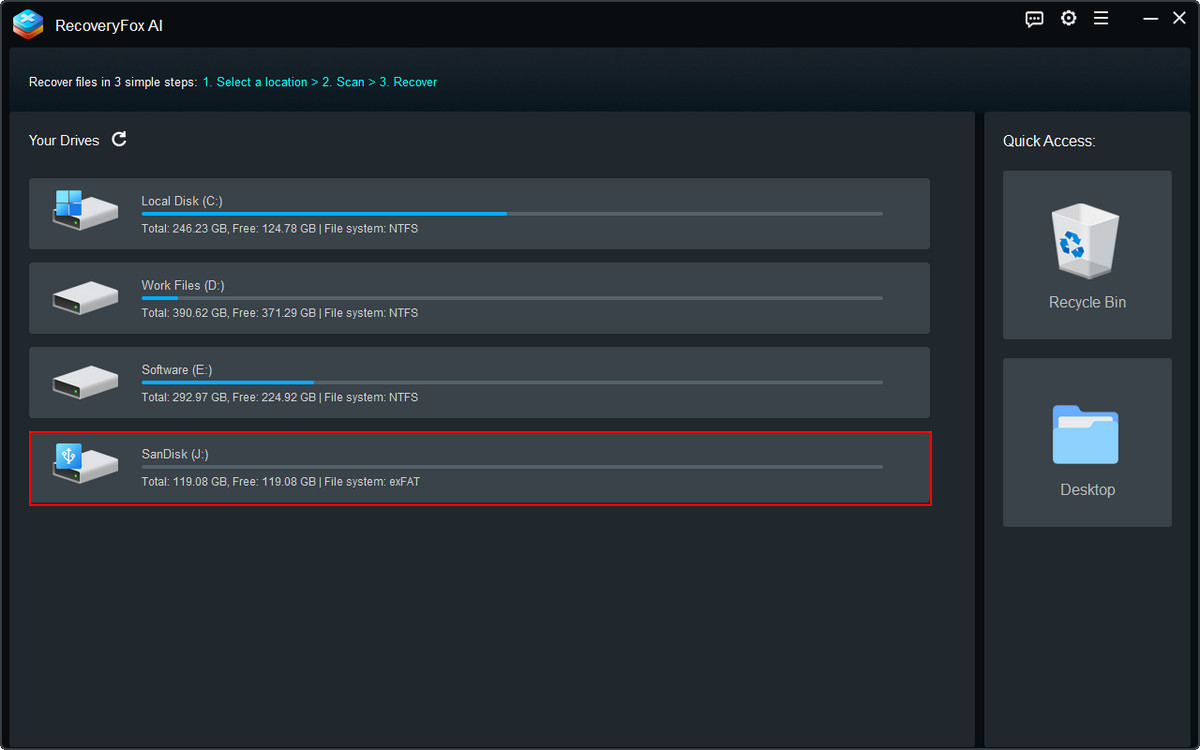
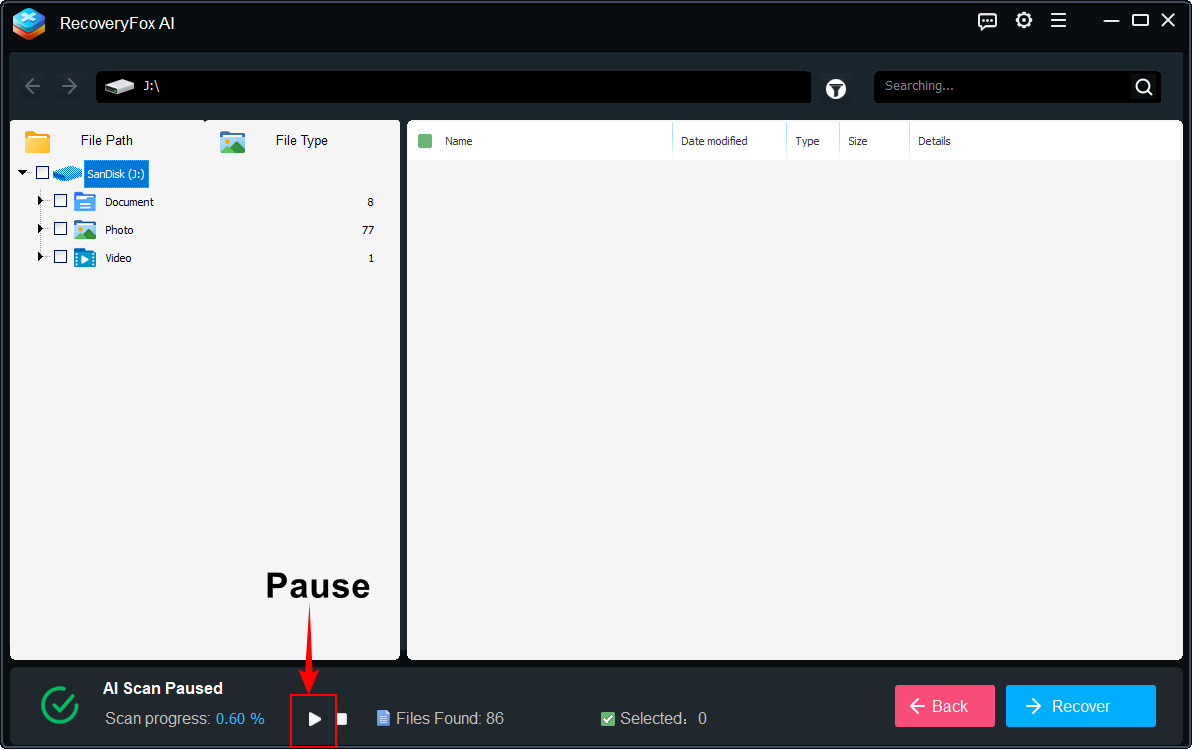
Step 2. Allow the AI Scan to complete for the best recovery results.
You may pause the scan at any time if needed.
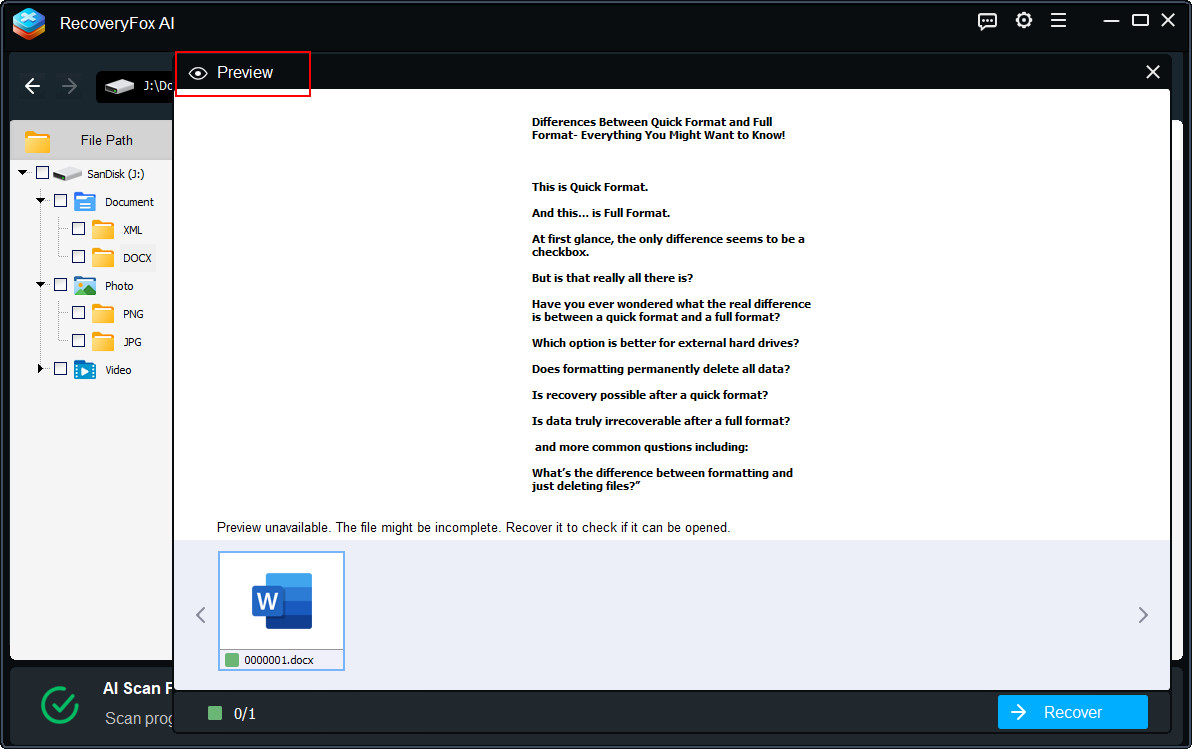
Step 3. Browse the scanned results by File Type.
Right-click any file and select Preview to see its content.
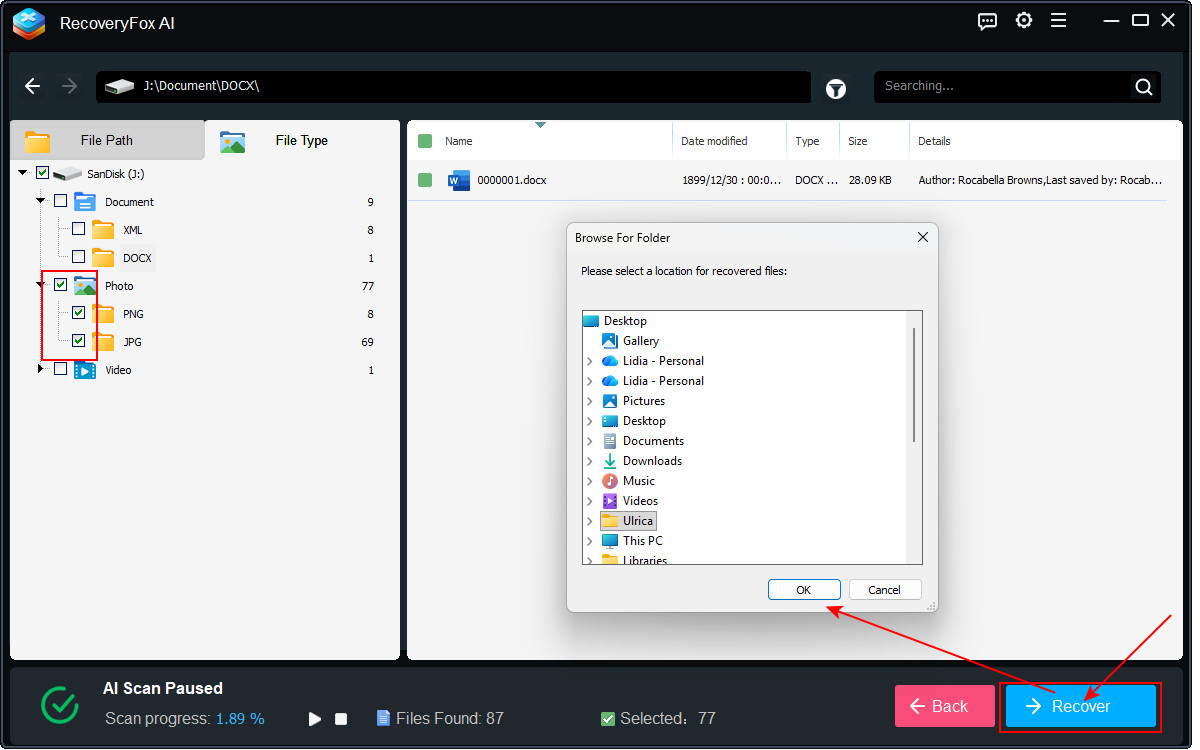
Step 4. At last, select the items, folders, or the entire scanned results you want to restore, and then click Recover.
Choose a different drive as the destination to save the recovered files to avoid overwriting.
Conclusion
For those without backups, it’s often recommended to recover formatted data from an SD card using dedicated data recovery software. We suggest trying RecoveryFox AI because of its high success rate and ease of use.
To maximize recovery results, remember to stop using the SD card immediately after formatting and always save recovered files to a different storage device. Taking the right steps early on can make the difference between partial recovery and complete data loss.
Now, try this powerful formatted file recovery tool to restore your formatted SD card data!
FAQs: Recover Data from Formatted SD Card
Q1. Can formatted SD cards be recovered?
Yes, in many cases. When an SD card is formatted, especially with a quick format, the file system metadata is cleared, but the underlying data often remains intact until it is overwritten. Using a reliable data recovery tool like RecoveryFox AI can help scan and reconstruct these lost files.
Q2. Is SD card recovery always possible?
No. Recovery success depends on several variables: whether new data has overwritten the original files, the formatting type (Quick Format or Full Format), and the physical condition of the card. The sooner you attempt recovery and the less you use the card after formatting, the higher the success rate.
📚 Related reading: Quick Format vs. Full Format: Why Your Data Is Still Recoverable?
Q3. How do I undo formatting an SD card?
There is no direct “undo” function for formatting. To restore your data, you need to use a dedicated formatted data recovery software to scan the SD card and retrieve lost files. Acting quickly and avoiding further use of the card are critical for the best recovery outcome.
Q4. How long does it take to recover data from a formatted SD card?
The recovery time depends on several factors, including the storage capacity of the SD card, the recovery tool used, and the amount of data. For larger cards or heavily fragmented data, it can take anywhere from several minutes to a few hours.
Q5. Can I recover data from an SD card that was formatted several times?
The recovery chances decrease with each format. Multiple formatting operations increase the likelihood that original data has been overwritten or corrupted. If no new data has been written after the last format, recovery tools may still be able to locate and reconstruct some files. However, the recovery results are typically less complete compared to a single-format scenario.

A technical content writer for RecoveryFox AI at WonderFox Soft, creating clear guides on data recovery, storage technologies, and Windows troubleshooting. She specializes in simplifying complex technical topics and enjoys exploring technology, running, and discovering new experiences.





 English ^


